
In today’s digital world, patients turn to Google when they need urgent medical care, specialist appointments, or trusted healthcare advice. If your practice isn’t visible online at the moment someone searches for your services, you’re losing patients to competitors every single day. That’s where Google Ads for doctors comes in.
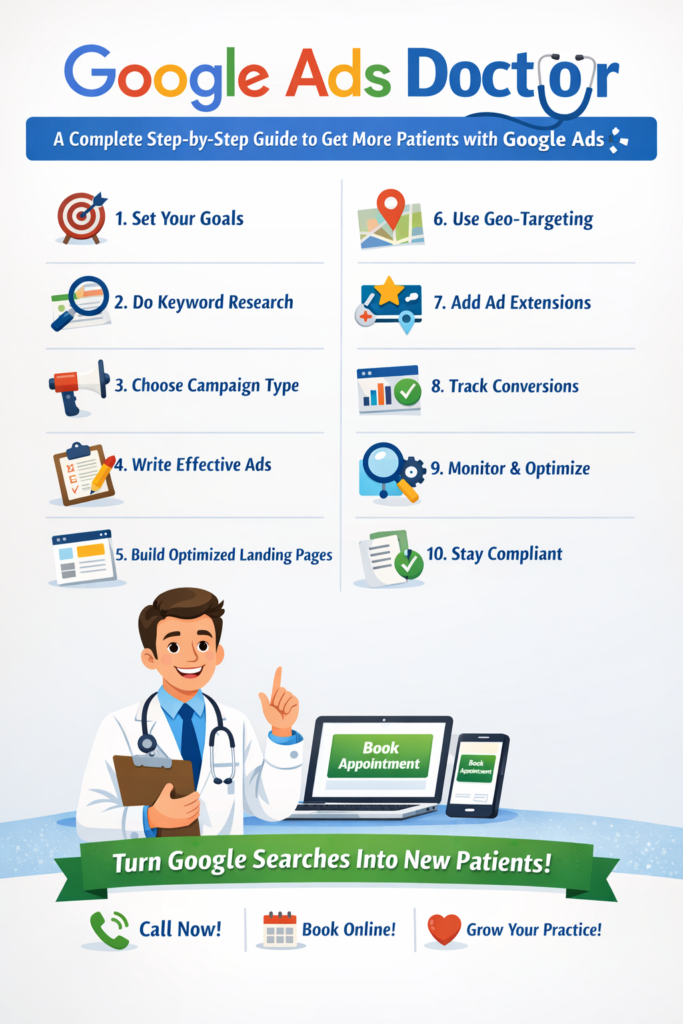
This comprehensive guide walks you through a 10 step-by-step process to set up and optimize your Google Ads campaigns so you can attract more local patients, increase appointments, and grow your practice profitably.
Step 1 : Define Your Advertising Goals
Before you dive into Google Ads, you must decide what outcome you want:
- Do you want more phone calls?
- More online appointment bookings?
- Increased form inquiries?
- Or, more telehealth consultations?
Choosing your primary goal will influence how you set up your campaign, which keywords you target, and how you measure success.
Step 2 : Conduct Smart Keyword Research
Keywords are the foundation of Google Ads. These are the search phrases real patients type into Google when looking for medical services.
Tips for good keyword research:
- Start with practice-specific terms like “family doctor near me”, “pediatric care [city]”, or “dermatologist appointment”.
- Focus on local keywords to attract nearby patients.
- Use tools like Google Keyword Planner to find search volume and competition levels.
Remember: the more relevant the keyword, the more likely Google will show your ad to people actively looking for what you offer.
Step 3 : Choose the Right Campaign Type
In Google Ads, you’ll choose a campaign type. For doctors, Search Network campaigns are often the most effective – they show your ad to people actively searching for healthcare services.
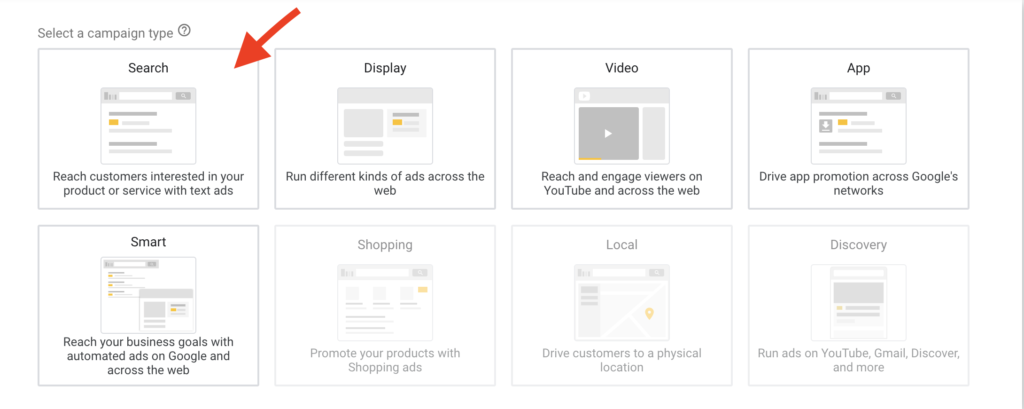
You can also experiment with:
Call-only campaigns to drive phone calls directly.
Ads Institute
Local Service Ads that feature your practice with reviews.
Ads Institute
Performance Max campaigns to reach patients across all of Google’s properties.
Step 4 : Write Compelling Ad Copy
Your ad copy needs to speak directly to patient needs – it’s not just about services, it’s about solutions. Include:
- A clear headline with your main keyword
- A benefit or unique strength (e.g., “Same-Day Appointments”)
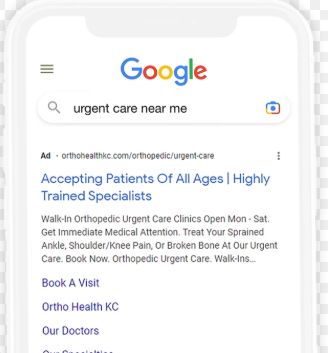
- A strong call-to-action (CTA), like “Book A Visit” or “Call Today”
For example:
**“Trusted Family Doctor in [City] – Same Day Appointments Available!”
Call Now or Book Online Today.
This approach increases the chances someone will click and convert.
Step 5 : Create Optimized Landing Pages
A common mistake doctors make is sending traffic to a generic homepage. Instead, design landing pages tailored to each campaign.
Landing page essentials:
Clear information about the service
A streamlined appointment booking feature
Visible phone number and contact form
Patient testimonials or trust signals
Your landing page should be a natural continuation of your ad – so patients don’t get confused or click away.
Step 6 : Use Geo-Targeting to Reach Local Patients
Most patients will seek care near them, not across the country.
In Google Ads, you can target people based on:
City, region, or specific radius around your clinic
Locations where your patients live or work
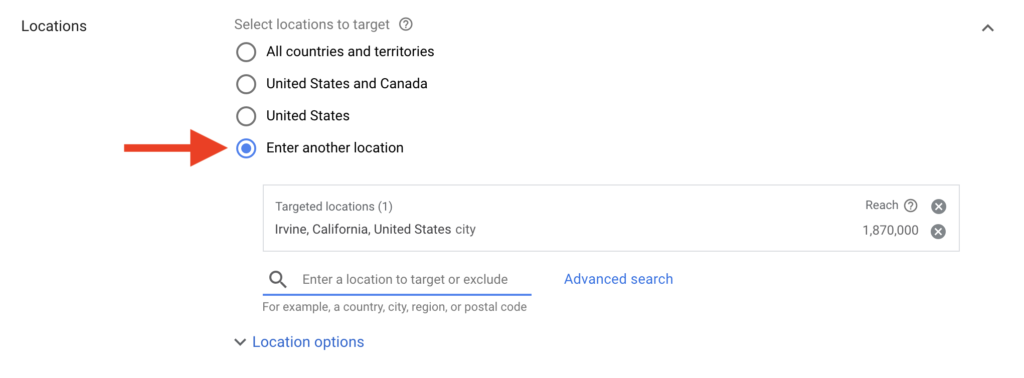
This ensures your ads are shown to the right people at the right time and saves your budget from wasted clicks.
Step 7 : Add Ad Extensions to Boost Visibility
Ad extensions make your ads larger and more informative without extra cost. Useful extensions for doctors include:
📞 Call Extensions : Makes it easy for patients to click and call
📍 Location Extensions : Shows your address
🔗 Sitelink Extensions : Links to specific pages like telehealth, consultations, reviews
These extensions improve your click-through rate and help patients get the info they need.
Step 8 : Set Up Conversion Tracking
To know if your ads are working, track the actions that matter: calls, bookings, form submissions. Use
- Google Ads conversion tracking
- Google Analytics
- CRM software integration (optional but powerful)
Tracking conversions helps you measure ROI and decide what needs improvement.
Step 9 : Monitor, Test & Optimize
Once live, your campaign must be actively managed:
- Review performance weekly
- Pause low-performing keywords
- Increase bids on high-converting terms
- A/B test different ad copies and landing pages
The more data you collect, the smarter your campaign becomes. Optimization is the key to scaling results without overspending.
Step 10 : Stay Compliant with Medical Advertising Rules
Healthcare ads must follow Google’s policies and legal regulations. Avoid:
- Making unrealistic medical promises
- Overly aggressive claims without clinical support
Being accurate and transparent keeps your ads running smoothly and builds patient trust.
Google Ads is one of the fastest ways for medical practices to attract new patients, but it requires thoughtful planning, optimization, and consistent improvement. When set up correctly, you’ll reach patients at the exact moment they need your care not weeks later.
Start with small tests, track your results, and refine your campaigns. With this step-by-step approach, you’re on your way to turning Google searches into real appointments and lasting patient relationships.