
What Are Product Data Optimizations?
Product Data Optimizations in Google Merchant Center allow Google to automatically enhance, correct, and align your product information with your website. The goal is simple:
More accurate product data → fewer disapprovals → better ad performance → higher conversions
Instead of relying only on your uploaded feed, Google cross-checks your website data (price, availability, delivery, condition, images) and applies safe, controlled updates where needed.
This is especially valuable for large inventories or frequently changing products like mobile phones, electronics, or fashion.
Why Product Data Optimizations Matter
Without optimization:
- Prices may mismatch between ads and site
- Products can show as “out of stock” incorrectly
- Delivery times may be missing or inaccurate
- Ads may get limited or disapproved
With optimization enabled:
- Google keeps your listings aligned automatically
- Customers see accurate information
- Ads become more competitive and trustworthy
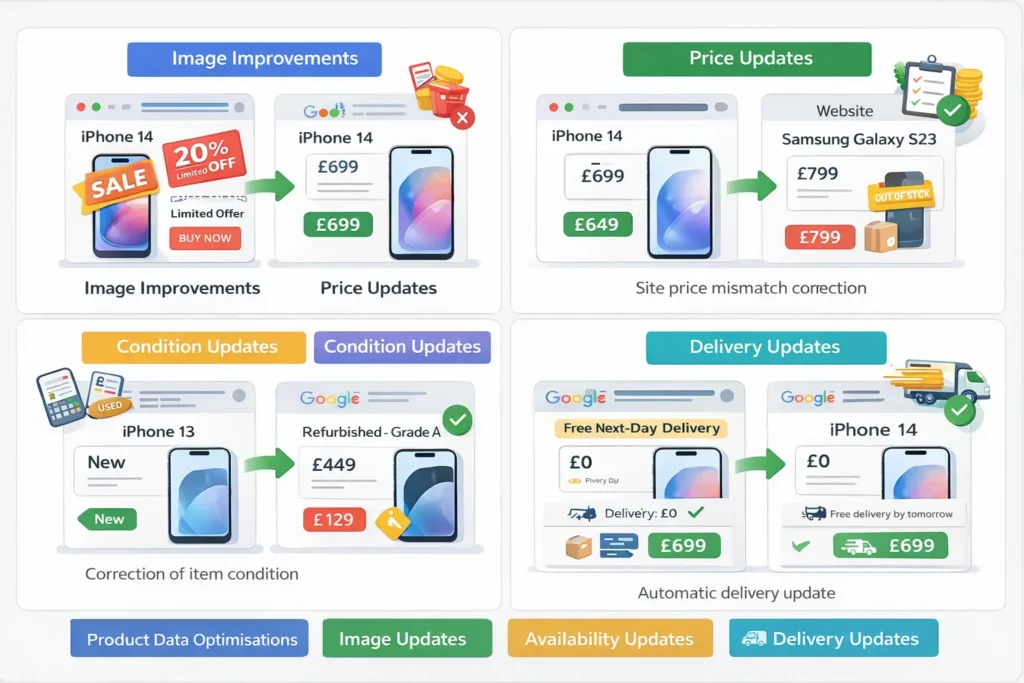
Key Product Data Optimization Features Explained
1. Image Improvements
What It Does
Google can automatically remove promotional overlays, watermarks, logos, or text from product images if they violate image policies.
Status in Your Account
Currently:
- No image issues detected
- Feature is off by default, but can be turned on to prevent future problems
When to Enable It
Enable if:
- Your images sometimes include “SALE”, “Free Shipping”, or branding overlays
- You upload images from suppliers with inconsistent quality
Mobile Phone Example
❌ Image shows:
iPhone 14 – 20% OFF – Limited Offer
✔ Google optimisation removes the text overlay and keeps only:
Clean image of the iPhone 14 on a white background
Result:
Better compliance + higher eligibility for Shopping Ads.
2. Price Updates
What It Does
Google automatically updates the product price in Merchant Center if it detects a mismatch with your website.
Why This Is Critical
Price mismatches are one of the top reasons for product disapproval.
Mobile Phone Example
- Feed price: £699
- Website price: £649
Google detects the difference and:
- Updates the Merchant Center price to £649
- Prevents disapproval
- Keeps ads running without interruption
Best Use Case
Ideal for:
- Promotional pricing
- Flash sales
- Automated pricing systems
3. Availability Updates
What It Does
Automatically updates product availability to match your website:
- in_stock
- out_of_stock
- preorder
Mobile Phone Example
- Samsung Galaxy S23 shows in stock in feed
- Website shows out of stock
Google updates availability to: out_of_stock
Result:
- No misleading ads
- Better customer experience
- Avoids policy violations
4. Condition Updates
What It Does
Google updates the product condition attribute:
- new
- used
- refurbished
Mobile Phone Example
- Feed: new
- Website: “Refurbished – Grade A”
Google corrects condition to:
refurbished
This is essential for electronics where condition directly affects buyer trust and compliance.
5. Delivery Updates (Highly Recommended)
What It Does
Google automatically updates:
- Shipping cost
- Delivery times
- Delivery policy accuracy
Based on what’s visible on your website.
Mobile Phone Example
Website states:
“Free next-day delivery on all mobile phones”
Google updates Merchant Center delivery to:
- Cost: £0
- Delivery time: 1 business day
Why This Matters
Accurate delivery data:
- Improves click-through rate
- Builds customer trust
- Helps your ads compete against marketplaces
Best Practices for Using Product Data Optimizations
1. Treat Optimizations as a Safety Net
They do not replace a clean feed, they protect you when mismatches happen.
2. Keep Website Data Clear & Structured
Google relies on:
- Visible prices
- Clear availability messages
- Consistent delivery info
3. Monitor “Optimized Products” Regularly
Check:
- How many products are being updated
- Which attributes change most often
This helps identify feed issues at the source.
4. Enable Delivery Updates Early
Delivery mismatches hurt performance silently. This optimization often delivers the biggest ROI.
When You Should Be Careful
Avoid enabling optimizations if:
- Your website shows different prices based on user location without proper markup
- You intentionally show conditional pricing (e.g., bundles, memberships)
In these cases, manual feed control may be better.
For most eCommerce stores, especially those selling mobile phones or fast-moving products Product Data Optimizations should be: Enabled for Price, Availability, Condition, and Delivery
Image improvements enabled as a preventive measure
Think of it as Google helping you keep your shop window accurate, clean, and conversion-ready 24/7.