
Understanding how users actually behave on your website is no longer optional – it’s essential. Tools like Microsoft Clarity and Hotjar help marketers, UX designers, and website owners visualize real user interactions such as clicks, scrolls, and rage taps.
But when it comes to Microsoft Clarity vs Hotjar, which one is the better choice in 2026?
In this detailed comparison, we’ll break down features, pricing, performance, privacy, and real-world use cases so you can confidently choose the right tool for your website.
What Is Microsoft Clarity?
Microsoft Clarity is a free user behavior analytics tool that helps you understand how visitors interact with your website through:
- Session recordings
- Heatmaps
- Scroll tracking
- Rage click detection
- Dead click insights
Clarity is widely used by SEO professionals, CRO experts, bloggers, and ecommerce sites because it offers enterprise-level insights at zero cost.
Key Highlights of Microsoft Clarity
- 100% free with no traffic limits
- Unlimited session recordings
- Automatic heatmaps
- Built-in rage & dead click detection
- Native integration with Google Analytics
What Is Hotjar?
Hotjar is a paid behavior analytics and feedback platform designed for businesses that need advanced UX research tools.
In addition to heatmaps and recordings, Hotjar includes:
- On-site surveys
- Feedback widgets
- Funnel analysis
- User interviews
- Conversion tracking
Hotjar is commonly used by product teams, SaaS companies, and UX researchers who need both qualitative and quantitative insights.
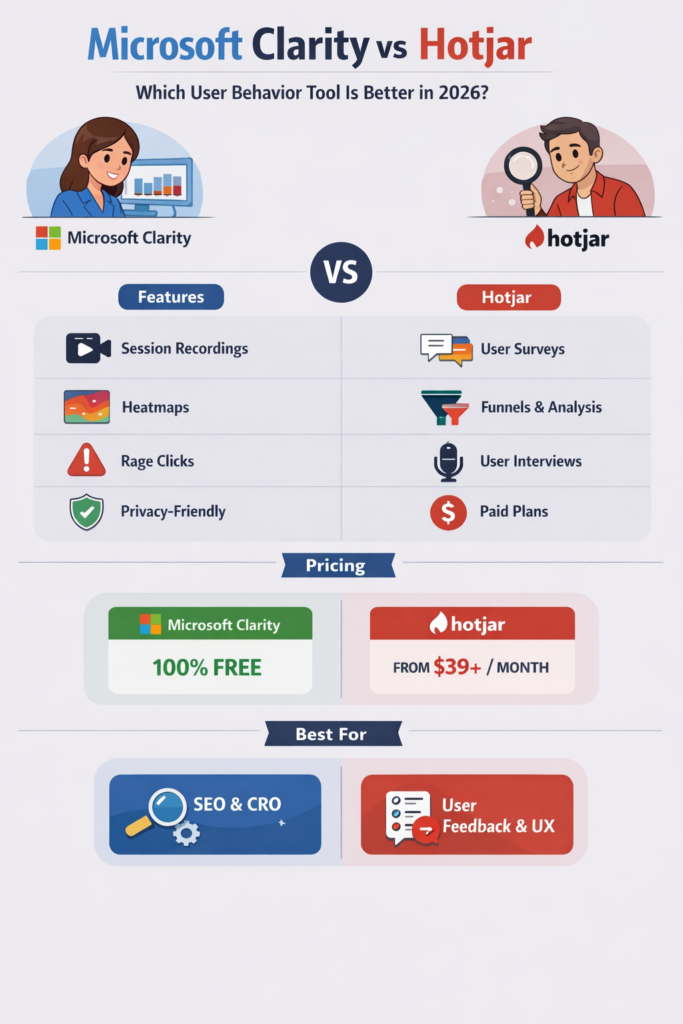
Microsoft Clarity vs Hotjar: Feature Comparison
1. Session Recordings
Both tools provide high-quality session recordings, but their approach differs.
Microsoft Clarity
- Unlimited recordings
- Automatically highlights rage clicks and frustration signals
- Faster playback with smart filters
Hotjar
- Recording limits based on plan
- Manual tagging and filtering
- More customization for research studies
Winner: Microsoft Clarity (unlimited + smarter automation)
2. Heatmaps (Click, Scroll & Area Maps)
Clarity Heatmaps
- Automatically generated
- Click, scroll, and area heatmaps
- Works without manual setup
Hotjar Heatmaps
- Highly visual and customizable
- Requires manual setup per page
- Limited by plan
Winner: Hotjar (better visuals), but Clarity wins for ease of use
3. User Feedback & Surveys
This is where Hotjar clearly leads.
Hotjar Offers:
- On-site polls
- Exit intent surveys
- Feedback widgets
- User interviews
Microsoft Clarity:
- No surveys or feedback tools
Winner: Hotjar (no competition here)
4. Performance Impact
Website speed matters.
Microsoft Clarity
- Lightweight script
- Minimal impact on page speed
- Designed for performance-first websites
Hotjar
- Slightly heavier script
- Can affect load speed on slower sites
Winner: Microsoft Clarity
5. Privacy & Compliance (GDPR, CCPA)
Microsoft Clarity
- Automatic PII masking
- GDPR-friendly by default
- No cookies required
Hotjar
- Strong privacy controls
- Requires cookie consent
- Manual setup for compliance
Winner: Microsoft Clarity (simpler compliance)
6. Pricing Comparison (2026)
| Tool | Free Plan | Paid Plans |
|---|---|---|
| Microsoft Clarity | 100% Free | None |
| Hotjar | Limited | Starts around $39+/month |
Winner: Microsoft Clarity (best value)
Microsoft Clarity vs Hotjar: Pros & Cons
Microsoft Clarity Pros
- Completely free
- Unlimited data
- Excellent rage click detection
- Google Analytics integration
- Lightweight and fast
Microsoft Clarity Cons
- No surveys or feedback tools
- Basic heatmap customization
Hotjar Pros
- Advanced feedback & survey tools
- Strong UX research capabilities
- Visual heatmaps
- Funnel insights
Hotjar Cons
- Expensive for high-traffic sites
- Recording limits
- Slight performance overhead
Which Tool Should You Choose?
Choose Microsoft Clarity if:
- You want a free heatmap & recording tool
- You focus on SEO, CRO, or landing page optimization
- You need unlimited session data
- Performance and privacy are top priorities
Choose Hotjar if:
- You need user feedback & surveys
- You run UX research or SaaS products
- You can afford a paid analytics tool
Can You Use Microsoft Clarity and Hotjar Together?
Yes and many advanced marketers do.
A smart setup:
- Microsoft Clarity → Behavioral insights & rage click analysis
- Hotjar → User feedback, surveys, and qualitative research
Using both gives you a complete user experience picture.
Final Verdict: Microsoft Clarity vs Hotjar (2026)
There’s no single winner it depends on your goals.
- Best Free Tool: Microsoft Clarity
- Best UX Research Platform: Hotjar
- Best for SEO & CRO: Microsoft Clarity
- Best for User Feedback: Hotjar
If you’re starting out or running a content-driven or ecommerce site, Microsoft Clarity is more than enough.
For product-led growth and deep UX research, Hotjar justifies the cost.
Pro Tip from a CRO Perspective
Use Clarity rage clicks + Hotjar surveys to uncover why users struggle and what stops conversions—this combo alone can increase conversion rates by double digits.