
Google Ads has become smarter every year, but audience strategy still plays a huge role in campaign success. One term advertisers often hear but don’t fully understand is layering an affinity audience.
So what does it actually mean? And more importantly, how should you use it in 2026 to improve targeting, relevance, and ROI?
What Is an Affinity Audience in Google Ads?
An Affinity Audience is a predefined audience group in Google Ads that represents people’s long-term interests and lifestyles.
Google builds these audiences based on:
- Browsing behavior
- App usage
- Search history
- YouTube viewing habits
- Engagement with content over time
Examples of Affinity Audiences
- Sports & Fitness Enthusiasts
- Frequent Travelers
- Food & Dining Lovers
- Technology Enthusiasts
- Business Professionals
- Home Improvement Buffs
What Does “Layering” an Affinity Audience Mean?
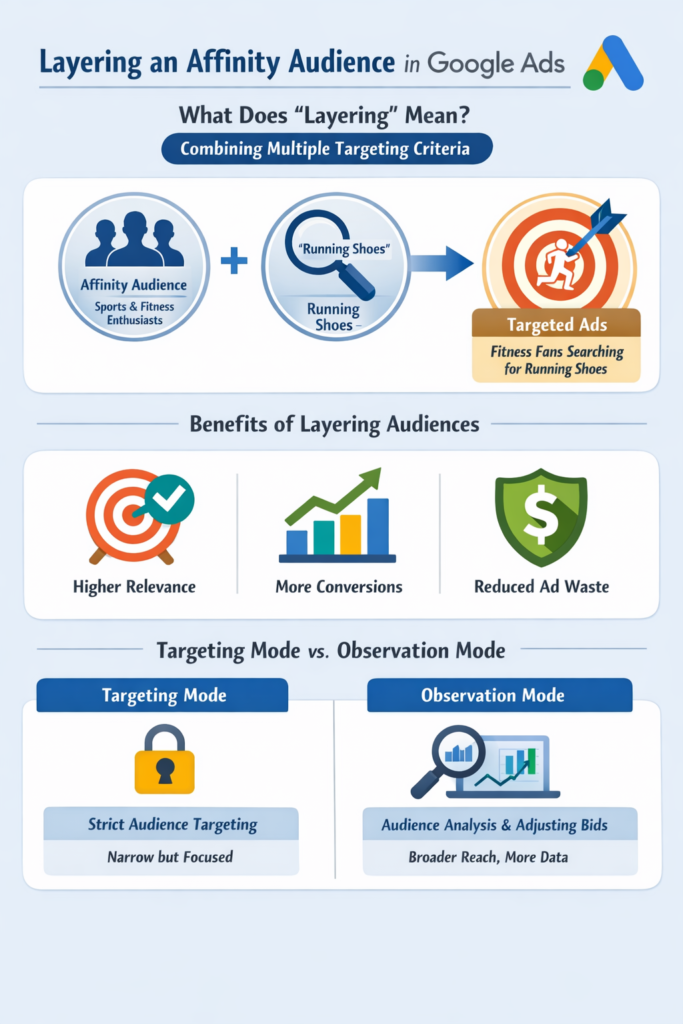
Layering an affinity audience means adding it on top of another targeting method instead of using it alone.
You’re essentially telling Google:
“Show my ads only when multiple targeting conditions are met.”
This allows for more precise audience refinement rather than broad reach.
How Audience Layering Works in Google Ads
Layering usually involves combining:
- Affinity audiences
- In-market audiences
- Demographics
- Keywords
- Topics
- Placements
Simple Example
You sell premium running shoes.
Instead of targeting:
Everyone searching for “running shoes”
You layer:
- Keywords: running shoes
- Affinity audience: Sports & Fitness Enthusiasts
Now your ads show only to people who:
- Are searching for running shoes
- Consistently show interest in fitness
This results in higher relevance and stronger intent.
Layering vs. Observation Mode (Important in 2026)
Google Ads now gives advertisers two main ways to use audiences:
1. Targeting Mode (Strict Layering)
- Ads are shown only to users in the selected audience
- Reach is smaller but more controlled
2. Observation Mode (Smart Layering)
- Audience data is collected
- Ads are shown to everyone, but you can:
- Adjust bids
- Analyze performance
- Optimize later
Why Layer an Affinity Audience?
Layering affinity audiences helps you:
1. Improve Ad Relevance
You avoid showing ads to people who are unlikely to care about your product.
2. Increase Conversion Rates
Interest-based filtering brings higher quality traffic.
3. Reduce Wasted Ad Spend
Less money spent on clicks from uninterested users.
4. Support Google’s AI Signals
Audience layers help Google’s smart bidding systems understand who converts best.
When Should You Use Affinity Audience Layering?
Affinity layering works best when:
- You sell lifestyle-driven products
- You run Display or YouTube campaigns
- You want brand awareness with relevance
- You’re refining broad search traffic
Best Campaign Types for Affinity Layering
- Google Display Network (GDN)
- YouTube Ads
- Demand Gen campaigns
- Upper-funnel Search campaigns
When NOT to Layer Affinity Audiences
Avoid strict affinity layering when:
- Your audience is already very niche
- Search volume is low
- You need maximum reach
- You’re running emergency or time-sensitive ads
Over-layering can limit scale and reduce impressions.
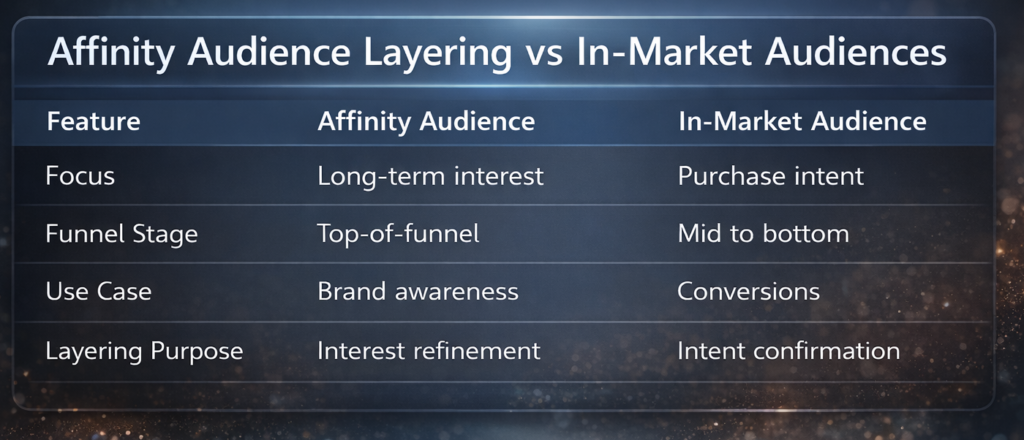
Affinity Audience Layering vs In-Market Audiences
Pro Tip:
Layer Affinity + In-Market audiences for balanced reach and intent.
How to Layer an Affinity Audience in Google Ads (Step-by-Step)
- Open your Google Ads campaign
- Go to Audiences, Keywords & Content
- Select Audiences
- Click Edit Audience Segments
- Choose Affinity Segments
- Set to Targeting or Observation
- Save and monitor performance
Common Mistakes to Avoid
- Layering too many audiences at once
- Using Targeting mode without testing
- Ignoring audience performance reports
- Assuming affinity = buyer intent
- Not adjusting bids after data collection
Is Layering an Affinity Audience Still Relevant in 2026?
Yes but smarter than ever.
While Google’s AI and broad match have evolved, audience signals remain critical. Layering affinity audiences helps:
- Guide automation
- Improve contextual relevance
- Support privacy-first targeting strategies
In a post-cookie world, interest-based audience layering is more valuable than ever.
Layering an affinity audience in Google Ads means refining who sees your ads based on long-term interests, not just search behavior.
Used correctly, it can:
- Improve ad performance
- Increase conversions
- Lower CPA
- Support smarter AI optimization
The key in 2026 is testing first, layering smartly, and letting data guide decisions.